Archetypal Analysis#
Introduction#
In this vignette, we present
a brief overview of the theory behind archetypal analysis
a description of the optimization procedure used in our implementation
a guide to using the
AAclass and itsAA.fit()method
Mathematical Setup (Notation and Objective)#
We use the same notation as in the supplementary methods:
\(N\): number of samples (cells), \(D\): embedding dimensions, \(K\): number of archetypes
\(\mathbf{X} \in \mathbb{R}^{N \times D}\): data matrix (row \(n\) is \(\mathbf{x}_n^T\))
\(\mathbf{A} \in \mathbb{R}^{N \times K}\): sample-to-archetype coefficients
\(\mathbf{B} \in \mathbb{R}^{K \times N}\): archetype-to-sample coefficients
\(\mathbf{Z} \in \mathbb{R}^{K \times D}\): archetype matrix
Archetypal analysis assumes
With row-stochastic constraints,
the optimization problem is
Important properties used below: the objective is translation/scale invariant in \(\mathbf{X}\) and biconvex in \((\mathbf{A},\mathbf{B})\).
First, we will import some package that we need throughout this vignette.
from datetime import datetime
import partipy as pt
import numpy as np
import matplotlib.pyplot as plt
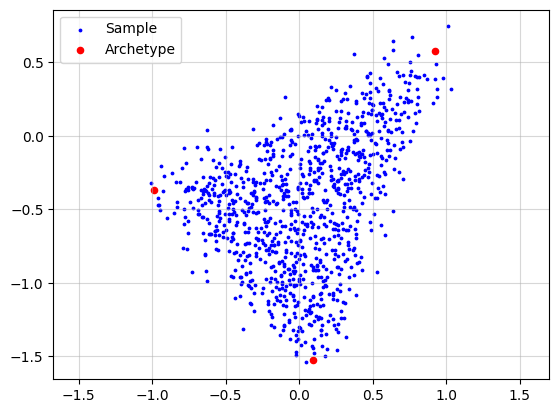
Now, we simulate a dataset to provide an intuitive explanation of archetypal analysis. To make the simulation more realistic, we add noise to each data point by sampling a noise vector from an isotropic Gaussian distribution.
X, A, Z = pt.simulate_archetypes(n_samples=1_000, n_archetypes=3, n_dimensions=2,
                                 noise_std=0.10, seed=123)
print(f"{X.shape}")
print(f"{A.shape}")
print(f"{Z.shape}")
(1000, 2)
(1000, 3)
(3, 2)
plt.grid(alpha=0.5)
plt.scatter(x=X[:, 0], y=X[:, 1], s=3, c="blue", label="Sample")
plt.scatter(x=Z[:, 0], y=Z[:, 1], s=20, c="red", label="Archetype")
plt.legend()
plt.axis("equal")
plt.show()
Standard Archetypal Analysis#
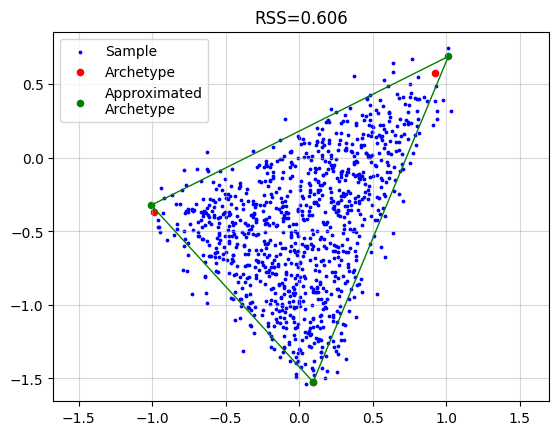
For standard archetypal analysis, we solve
with alternating updates:
In this notebook, pt.AA(...) executes this procedure (with solver-specific updates under simplex constraints).
AA_object = pt.AA(n_archetypes=3)
AA_object.fit(X)
Z_hat = AA_object.Z

plt.grid(alpha=0.5)
plt.scatter(x=X[:, 0], y=X[:, 1], s=3, c="blue", label="Sample")
plt.scatter(x=Z[:, 0], y=Z[:, 1], s=20, c="red", label="Archetype")
plt.scatter(x=Z_hat[:, 0], y=Z_hat[:, 1], s=20, c="green", label="Approximated\nArchetype")
Z_loop = np.vstack([Z_hat, Z_hat[0]])
plt.plot(Z_loop[:, 0], Z_loop[:, 1], c="green", linestyle='-', linewidth=1)
plt.title(f"RSS={AA_object.RSS:.3f}")
plt.legend()
plt.axis("equal")
plt.show()
Relaxation of Convex Constraint on Archetypes#
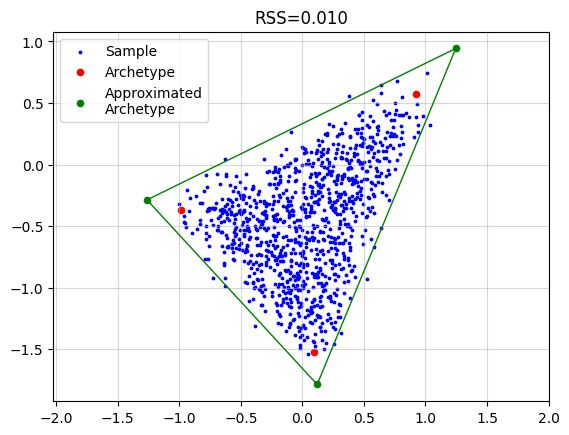
With delta > 0, ParTIpy relaxes the strict convex-hull constraint on archetypes. A convenient formulation is
with archetypes
Setting \(\delta=0\) recovers standard archetypal analysis. This relaxation follows the formulation introduced in [MH12] and has been used in downstream ParTI applications [KSH+15].
AA_object = pt.AA(n_archetypes=3, delta=0.25)
AA_object.fit(X)
Z_hat = AA_object.Z

plt.grid(alpha=0.5)
plt.scatter(x=X[:, 0], y=X[:, 1], s=3, c="blue", label="Sample")
plt.scatter(x=Z[:, 0], y=Z[:, 1], s=20, c="red", label="Archetype")
plt.scatter(x=Z_hat[:, 0], y=Z_hat[:, 1], s=20, c="green", label="Approximated\nArchetype")
Z_loop = np.vstack([Z_hat, Z_hat[0]])
plt.plot(Z_loop[:, 0], Z_loop[:, 1], c="green", linestyle='-', linewidth=1)
plt.title(f"RSS={AA_object.RSS:.3f}")
plt.legend()
plt.axis("equal")
plt.show()
Robust Archetypal Analysis#
ParTIpy’s robust mode uses an iterative reweighting scheme (IRLS-like), following robust archetypal analysis ideas from [EL11]. In iteration \(t\), with sample weights \(\mathbf{w}^{(t)}\) and \(\mathbf{W}^{(t)}=\operatorname{diag}(\mathbf{w}^{(t)})\), the implemented updates are:
Then residuals are recomputed on the original scale,
and weights are updated as \(\mathbf{w}^{(t+1)} = \omega(\mathbf{R}^{(t+1)})\) (e.g. bisquare, huber).
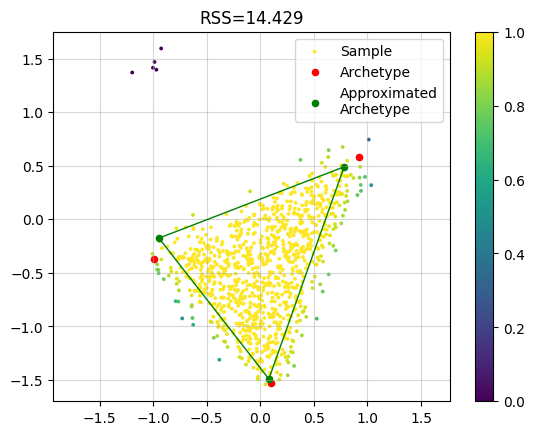
In the bisquare option below, strong outliers are down-weighted toward zero.
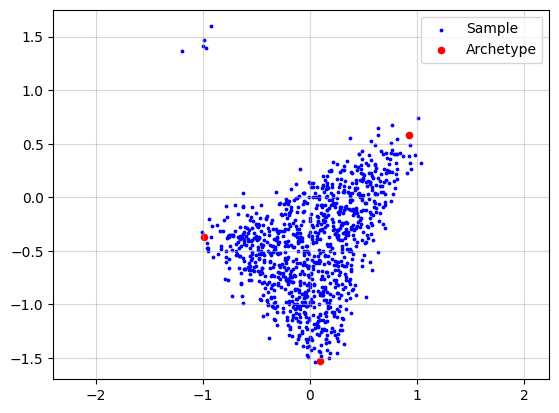
To demonstrate this behavior, we now add synthetic outliers.
n_outliers = 5
outlier_mean = np.array([-1.0, 1.5])
X_wo = np.zeros((X.shape[0]+n_outliers, X.shape[1]))
X_wo[:X.shape[0], :] = X.copy()
rng = np.random.default_rng(seed=42)
X_wo[X.shape[0]:, :] = rng.normal(loc=outlier_mean, scale=(0.1, 0.1), size=(n_outliers, 2))

print(f"{X_wo.shape}")
print(f"{A.shape}")
print(f"{Z.shape}")
(1005, 2)
(1000, 3)
(3, 2)
plt.grid(alpha=0.5)
plt.scatter(x=X_wo[:, 0], y=X_wo[:, 1], s=3, c="blue", label="Sample")
plt.scatter(x=Z[:, 0], y=Z[:, 1], s=20, c="red", label="Archetype")
plt.legend()
plt.axis("equal")
plt.show()
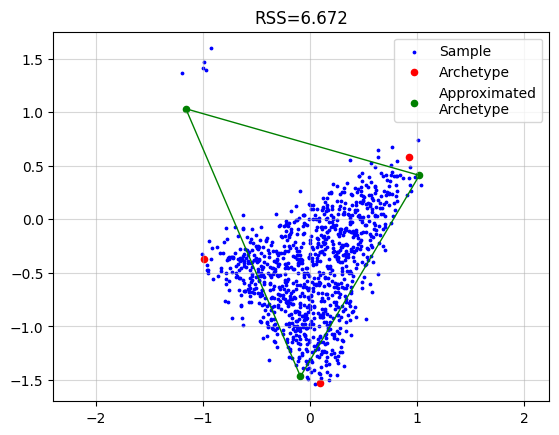
Now if we just run the standard algorithm we obtain.
AA_object = pt.AA(n_archetypes=3)
AA_object.fit(X_wo)
Z_hat = AA_object.Z

plt.grid(alpha=0.5)
plt.scatter(x=X_wo[:, 0], y=X_wo[:, 1], s=3, c="blue", label="Sample")
plt.scatter(x=Z[:, 0], y=Z[:, 1], s=20, c="red", label="Archetype")
plt.scatter(x=Z_hat[:, 0], y=Z_hat[:, 1], s=20, c="green", label="Approximated\nArchetype")
Z_loop = np.vstack([Z_hat, Z_hat[0]])
plt.plot(Z_loop[:, 0], Z_loop[:, 1], c="green", linestyle='-', linewidth=1)
plt.title(f"RSS={AA_object.RSS:.3f}")
plt.legend()
plt.axis("equal")
plt.show()
However, if we use the robust implementation we get a much better result. In the plot we colored each sample by the final weight. We see that the outlier samples have zero weight.
AA_object = pt.AA(n_archetypes=3, weight="bisquare", early_stopping=False)
AA_object.fit(X_wo)
Z_hat = AA_object.Z

plt.grid(alpha=0.5)
plt.scatter(x=X_wo[:, 0], y=X_wo[:, 1], s=3, c=AA_object.W, label="Sample")
plt.scatter(x=Z[:, 0], y=Z[:, 1], s=20, c="red", label="Archetype")
plt.scatter(x=Z_hat[:, 0], y=Z_hat[:, 1], s=20, c="green", label="Approximated\nArchetype")
Z_loop = np.vstack([Z_hat, Z_hat[0]])
plt.plot(Z_loop[:, 0], Z_loop[:, 1], c="green", linestyle='-', linewidth=1)
plt.title(f"RSS={AA_object.RSS:.3f}")
plt.legend()
plt.colorbar()
plt.axis("equal")
plt.show()
Coresets#
For large \(N\), we can optimize on a weighted subset (coreset) \(\tilde{\mathbf{X}} \in \mathbb{R}^{\tilde{N} \times D}\) with \(\tilde{N} \ll N\):
where \(\mathbf{W}\) is diagonal. In the current implementation, its diagonal entries are the square roots of coreset weights.
After convergence on the coreset, \(\mathbf{A}\) is recomputed on the full dataset with fixed \(\mathbf{Z}=\mathbf{B}\tilde{\mathbf{X}}\). This follows the AA coreset construction in [MB19], which adapts lightweight coreset ideas from [BLK18].
Let’s use the same underlying archetypes but generate many more samples to illustrate the computational effect.
X, A, Z = pt.simulate_archetypes(n_samples=200_000, n_archetypes=3, n_dimensions=2,
                                 noise_std=0.10, seed=123)
print(f"{X.shape}")
print(f"{A.shape}")
print(f"{Z.shape}")
(200000, 2)
(200000, 3)
(3, 2)
plt.grid(alpha=0.5)
plt.scatter(x=X[:, 0], y=X[:, 1], s=3, c="blue", label="Sample", alpha=0.1)
plt.scatter(x=Z[:, 0], y=Z[:, 1], s=20, c="red", label="Archetype")
plt.legend()
plt.axis("equal")
plt.show()
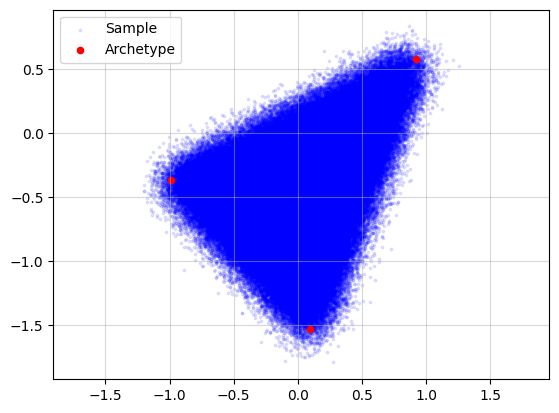
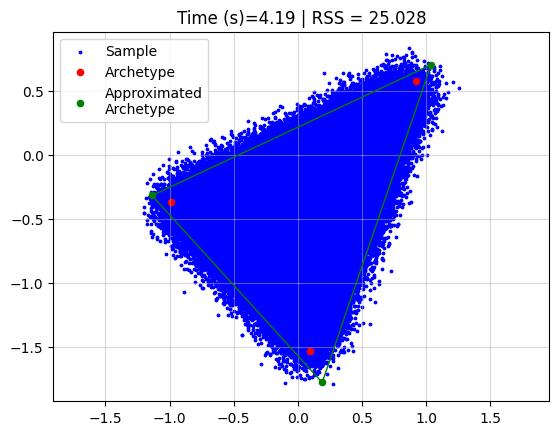
Running archetypal analysis now takes quite some time
start = datetime.now()
AA_object = pt.AA(n_archetypes=3)
AA_object.fit(X)
Z_hat = AA_object.Z
end = datetime.now()
time = (end - start).total_seconds()

plt.grid(alpha=0.5)
plt.scatter(x=X[:, 0], y=X[:, 1], s=3, c="blue", label="Sample")
plt.scatter(x=Z[:, 0], y=Z[:, 1], s=20, c="red", label="Archetype")
plt.scatter(x=Z_hat[:, 0], y=Z_hat[:, 1], s=20, c="green", label="Approximated\nArchetype")
Z_loop = np.vstack([Z_hat, Z_hat[0]])
plt.plot(Z_loop[:, 0], Z_loop[:, 1], c="green", linestyle='-', linewidth=1)
plt.title(f"Time (s)={time:.2f} | RSS = {AA_object.RSS:.3f}")
plt.legend()
plt.axis("equal")
plt.show()
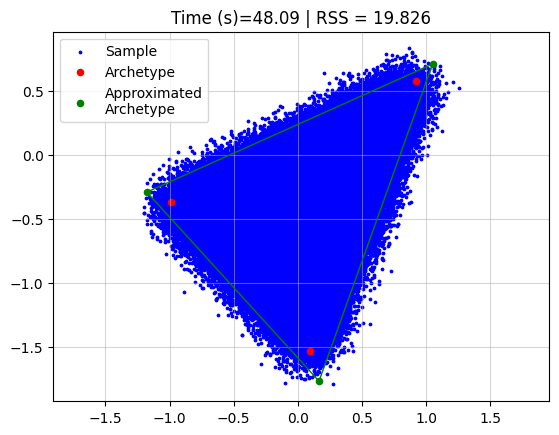
However, if we use coresets we can drastically reduce the time, without affecting the reconstruction a lot.
start = datetime.now()
AA_object = pt.AA(n_archetypes=3, coreset_algorithm="standard", coreset_fraction=0.05)
AA_object.fit(X)
Z_hat = AA_object.Z
end = datetime.now()
time = (end - start).total_seconds()

plt.grid(alpha=0.5)
plt.scatter(x=X[:, 0], y=X[:, 1], s=3, c="blue", label="Sample")
plt.scatter(x=Z[:, 0], y=Z[:, 1], s=20, c="red", label="Archetype")
plt.scatter(x=Z_hat[:, 0], y=Z_hat[:, 1], s=20, c="green", label="Approximated\nArchetype")
Z_loop = np.vstack([Z_hat, Z_hat[0]])
plt.plot(Z_loop[:, 0], Z_loop[:, 1], c="green", linestyle='-', linewidth=1)
plt.title(f"Time (s)={time:.2f} | RSS = {AA_object.RSS:.3f}")
plt.legend()
plt.axis("equal")
plt.show()