Archetypal Analysis#
Introduction#
In this vignette, we present
a brief overview of the theory behind archetypal analysis
a description of the optimization procedure used in our implementation
a guide to using the
AAclass and itsAA.fit()method
First, we will import some package that we need throughout this vignette.
from datetime import datetime
import partipy as pt
import numpy as np
import matplotlib.pyplot as plt
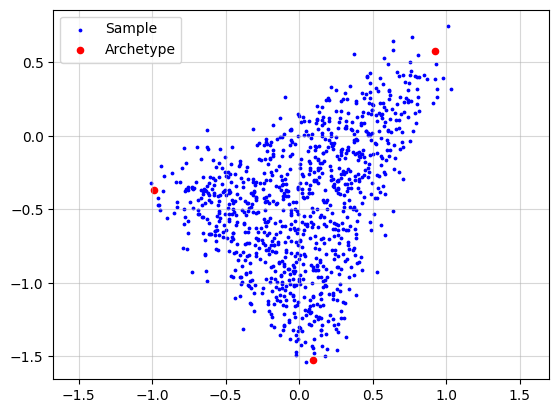
Now, we simulate a dataset to provide an intuitive explanation of archetypal analysis. To make the simulation more realistic, we add noise to each data point by sampling a noise vector from an isotropic Gaussian distribution.
X, A, Z = pt.simulate_archetypes(n_samples=1_000, n_archetypes=3, n_dimensions=2,
                                 noise_std=0.10, seed=123)
print(f"{X.shape}")
print(f"{A.shape}")
print(f"{Z.shape}")
(1000, 2)
(1000, 3)
(3, 2)
plt.grid(alpha=0.5)
plt.scatter(x=X[:, 0], y=X[:, 1], s=3, c="blue", label="Sample")
plt.scatter(x=Z[:, 0], y=Z[:, 1], s=20, c="red", label="Archetype")
plt.legend()
plt.axis("equal")
plt.show()
Standard Archetypal Analysis#
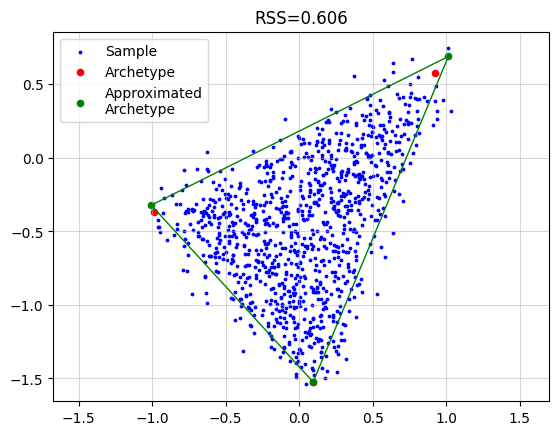
To recover the archetypes we simply need to call
AA_object = pt.AA(n_archetypes=3)
AA_object.fit(X)
Z_hat = AA_object.Z

plt.grid(alpha=0.5)
plt.scatter(x=X[:, 0], y=X[:, 1], s=3, c="blue", label="Sample")
plt.scatter(x=Z[:, 0], y=Z[:, 1], s=20, c="red", label="Archetype")
plt.scatter(x=Z_hat[:, 0], y=Z_hat[:, 1], s=20, c="green", label="Approximated\nArchetype")
Z_loop = np.vstack([Z_hat, Z_hat[0]])
plt.plot(Z_loop[:, 0], Z_loop[:, 1], c="green", linestyle='-', linewidth=1)
plt.title(f"RSS={AA_object.RSS:.3f}")
plt.legend()
plt.axis("equal")
plt.show()
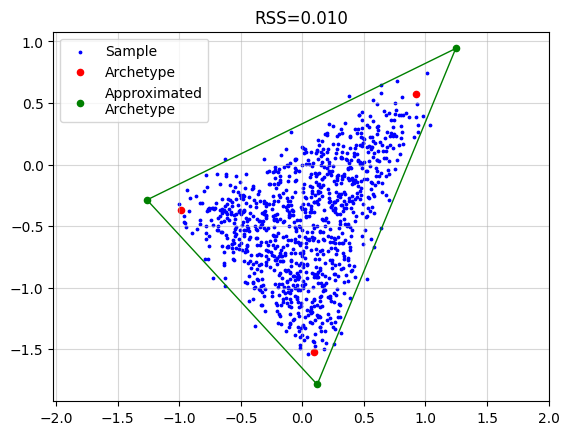
Relaxation of Convex Constraint on Archetypes#
AA_object = pt.AA(n_archetypes=3, delta=0.25)
AA_object.fit(X)
Z_hat = AA_object.Z

plt.grid(alpha=0.5)
plt.scatter(x=X[:, 0], y=X[:, 1], s=3, c="blue", label="Sample")
plt.scatter(x=Z[:, 0], y=Z[:, 1], s=20, c="red", label="Archetype")
plt.scatter(x=Z_hat[:, 0], y=Z_hat[:, 1], s=20, c="green", label="Approximated\nArchetype")
Z_loop = np.vstack([Z_hat, Z_hat[0]])
plt.plot(Z_loop[:, 0], Z_loop[:, 1], c="green", linestyle='-', linewidth=1)
plt.title(f"RSS={AA_object.RSS:.3f}")
plt.legend()
plt.axis("equal")
plt.show()
Robust Archetypal Analysis#
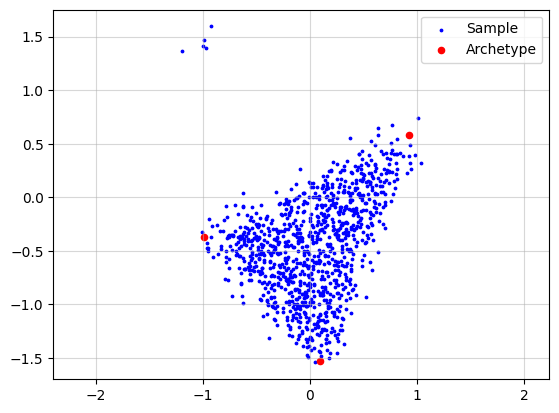
To demonstrate robust archetypal anaysis we will add some outliers here.
n_outliers = 5
outlier_mean = np.array([-1.0, 1.5])
X_wo = np.zeros((X.shape[0]+n_outliers, X.shape[1]))
X_wo[:X.shape[0], :] = X.copy()
rng = np.random.default_rng(seed=42)
X_wo[X.shape[0]:, :] = rng.normal(loc=outlier_mean, scale=(0.1, 0.1), size=(n_outliers, 2))

print(f"{X_wo.shape}")
print(f"{A.shape}")
print(f"{Z.shape}")
(1005, 2)
(1000, 3)
(3, 2)
plt.grid(alpha=0.5)
plt.scatter(x=X_wo[:, 0], y=X_wo[:, 1], s=3, c="blue", label="Sample")
plt.scatter(x=Z[:, 0], y=Z[:, 1], s=20, c="red", label="Archetype")
plt.legend()
plt.axis("equal")
plt.show()
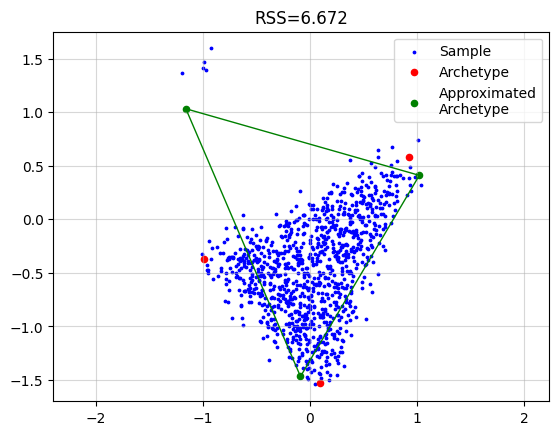
Now if we just run the standard algorithm we obtain.
AA_object = pt.AA(n_archetypes=3)
AA_object.fit(X_wo)
Z_hat = AA_object.Z

plt.grid(alpha=0.5)
plt.scatter(x=X_wo[:, 0], y=X_wo[:, 1], s=3, c="blue", label="Sample")
plt.scatter(x=Z[:, 0], y=Z[:, 1], s=20, c="red", label="Archetype")
plt.scatter(x=Z_hat[:, 0], y=Z_hat[:, 1], s=20, c="green", label="Approximated\nArchetype")
Z_loop = np.vstack([Z_hat, Z_hat[0]])
plt.plot(Z_loop[:, 0], Z_loop[:, 1], c="green", linestyle='-', linewidth=1)
plt.title(f"RSS={AA_object.RSS:.3f}")
plt.legend()
plt.axis("equal")
plt.show()
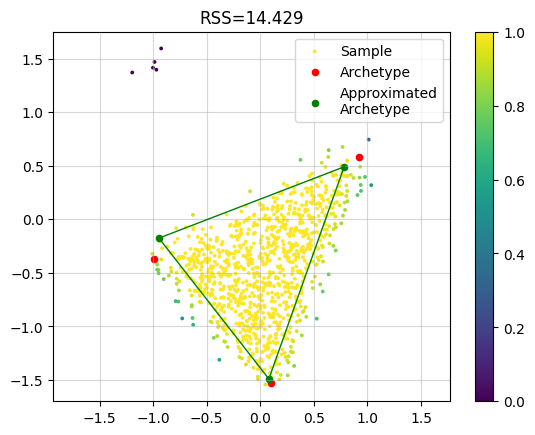
However, if we use the robust implementation we get a much better result. In the plot we colored each sample by the final weight. We see that the outlier samples have zero weight.
AA_object = pt.AA(n_archetypes=3, weight="bisquare", early_stopping=False)
AA_object.fit(X_wo)
Z_hat = AA_object.Z

plt.grid(alpha=0.5)
plt.scatter(x=X_wo[:, 0], y=X_wo[:, 1], s=3, c=AA_object.W, label="Sample")
plt.scatter(x=Z[:, 0], y=Z[:, 1], s=20, c="red", label="Archetype")
plt.scatter(x=Z_hat[:, 0], y=Z_hat[:, 1], s=20, c="green", label="Approximated\nArchetype")
Z_loop = np.vstack([Z_hat, Z_hat[0]])
plt.plot(Z_loop[:, 0], Z_loop[:, 1], c="green", linestyle='-', linewidth=1)
plt.title(f"RSS={AA_object.RSS:.3f}")
plt.legend()
plt.colorbar()
plt.axis("equal")
plt.show()
Coresets#
Let’s use the same archetypes but generate much more samples.
X, A, Z = pt.simulate_archetypes(n_samples=200_000, n_archetypes=3, n_dimensions=2,
                                 noise_std=0.10, seed=123)
print(f"{X.shape}")
print(f"{A.shape}")
print(f"{Z.shape}")
(200000, 2)
(200000, 3)
(3, 2)
plt.grid(alpha=0.5)
plt.scatter(x=X[:, 0], y=X[:, 1], s=3, c="blue", label="Sample", alpha=0.1)
plt.scatter(x=Z[:, 0], y=Z[:, 1], s=20, c="red", label="Archetype")
plt.legend()
plt.axis("equal")
plt.show()
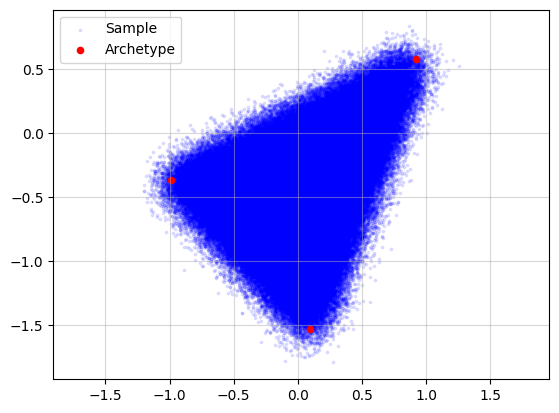
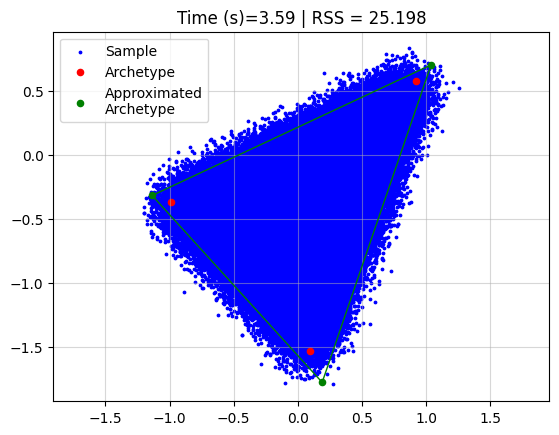
Running archetypal analysis now takes quite some time
start = datetime.now()
AA_object = pt.AA(n_archetypes=3)
AA_object.fit(X)
Z_hat = AA_object.Z
end = datetime.now()
time = (end - start).total_seconds()

plt.grid(alpha=0.5)
plt.scatter(x=X[:, 0], y=X[:, 1], s=3, c="blue", label="Sample")
plt.scatter(x=Z[:, 0], y=Z[:, 1], s=20, c="red", label="Archetype")
plt.scatter(x=Z_hat[:, 0], y=Z_hat[:, 1], s=20, c="green", label="Approximated\nArchetype")
Z_loop = np.vstack([Z_hat, Z_hat[0]])
plt.plot(Z_loop[:, 0], Z_loop[:, 1], c="green", linestyle='-', linewidth=1)
plt.title(f"Time (s)={time:.2f} | RSS = {AA_object.RSS:.3f}")
plt.legend()
plt.axis("equal")
plt.show()
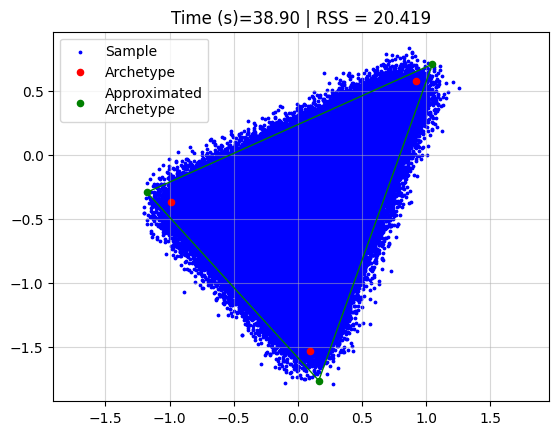
However, if we use coresets we can drastically reduce the time, without affecting the performance a lot.
start = datetime.now()
AA_object = pt.AA(n_archetypes=3, coreset_algorithm="standard", coreset_fraction=0.05)
AA_object.fit(X)
Z_hat = AA_object.Z
end = datetime.now()
time = (end - start).total_seconds()

plt.grid(alpha=0.5)
plt.scatter(x=X[:, 0], y=X[:, 1], s=3, c="blue", label="Sample")
plt.scatter(x=Z[:, 0], y=Z[:, 1], s=20, c="red", label="Archetype")
plt.scatter(x=Z_hat[:, 0], y=Z_hat[:, 1], s=20, c="green", label="Approximated\nArchetype")
Z_loop = np.vstack([Z_hat, Z_hat[0]])
plt.plot(Z_loop[:, 0], Z_loop[:, 1], c="green", linestyle='-', linewidth=1)
plt.title(f"Time (s)={time:.2f} | RSS = {AA_object.RSS:.3f}")
plt.legend()
plt.axis("equal")
plt.show()